English translation for this page is currently unavailable. We are working on it, stay tuned!


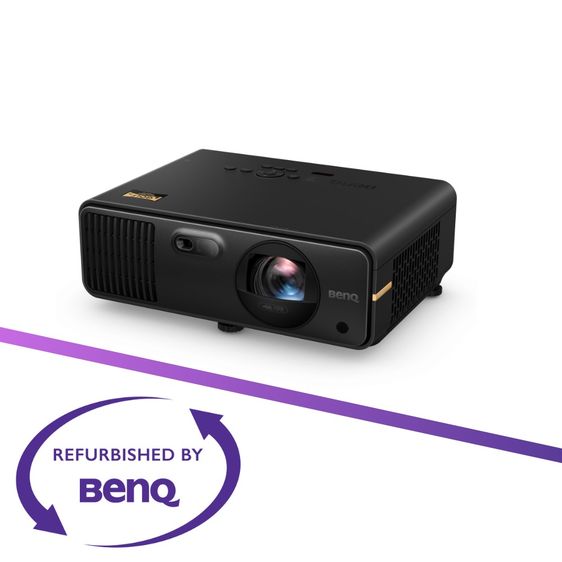
1 / 1
BenQ AK700ST The First 4K Laser Golf Simulator Projector Switching Ease Between Golf and Cinema
฿ 50,000ลงขายโดยBenQ Thailand
รายละเอียดสินค้า
【Highlights】
📌4,000lm laser light source for high brightness
📌Short throw ratio (0.69 – 0.83) ideal for small spaces
📌Intuitive 1.2x motorized zoom for easy adjustments
📌One-key Auto Screen Fit, switching between golf and cinema in under 10 seconds
📌One-key Quick Focus for simple manual fine-tuning
📌3D keystone correction and corner fit for optimal image alignment
📌Default golf mode
📌Mobile Wi-Fi ready for easy wireless connectivity
📌USB-C interface compatible with PC, Mac, and mobile devices
1. Motorized Short Throw Lens with Zoom
Keeping shadows off the screen and golf clubs away from the projector is essential in a home golf simulator projector. AK700ST features a flexible 0.69 – 0.83 short throw ratio with motorized optical zoom, enabling golfers to have more flexibility with their mounting location so they can securely mount the projector to a stud far enough away from the hitting area while filling a large 10-foot-high impact screen.
2. Auto Screen Fit
Instead of navigating complex on-screen menus with the remote control, AK700ST utilizes advanced camera and sensor technology that makes all the adjustments automatically to correctly fill the impact screen. With just one click, AK700ST adjusts and aligns the projection image to the screen’s edge, properly formatting the image to the correct aspect ratio and making other corrections to fine-tune the picture. The projector can adjust to nearly any screen size and aspect ratio, completing image adjustments in just 10 seconds. It then sends the correct aspect ratio and resolution back to the PC as EDID data. This eliminates having to change the resolution on your graphics card as well as manually adjust the picture using the remote.
3. Quick Focus
No golfer wants to get on a ladder to refocus a projector lens. AK700ST now uses a motorized lens and sensors to focus the image with a single tap of the remote control, allowing you to enjoy sharp and clear images for a perfect visual experience anytime, anywhere.
4. A Remote Control Designed for Golfers
Projector remote controls are typically designed for AV experts and home theater users – not first-time golf sim projector users. BenQ completely redesigned the traditional remote with quick access buttons for the most frequently used screen adjustments right at the top. This eliminates the need to navigate through the on-screen menu, so they can easily correct their screen and quickly get back to adjusting their swing.
หากสนใจรบกวนทักลาย @BenQCare ครับอ่านเพิ่มเติม
📌4,000lm laser light source for high brightness
📌Short throw ratio (0.69 – 0.83) ideal for small spaces
📌Intuitive 1.2x motorized zoom for easy adjustments
📌One-key Auto Screen Fit, switching between golf and cinema in under 10 seconds
📌One-key Quick Focus for simple manual fine-tuning
📌3D keystone correction and corner fit for optimal image alignment
📌Default golf mode
📌Mobile Wi-Fi ready for easy wireless connectivity
📌USB-C interface compatible with PC, Mac, and mobile devices
1. Motorized Short Throw Lens with Zoom
Keeping shadows off the screen and golf clubs away from the projector is essential in a home golf simulator projector. AK700ST features a flexible 0.69 – 0.83 short throw ratio with motorized optical zoom, enabling golfers to have more flexibility with their mounting location so they can securely mount the projector to a stud far enough away from the hitting area while filling a large 10-foot-high impact screen.
2. Auto Screen Fit
Instead of navigating complex on-screen menus with the remote control, AK700ST utilizes advanced camera and sensor technology that makes all the adjustments automatically to correctly fill the impact screen. With just one click, AK700ST adjusts and aligns the projection image to the screen’s edge, properly formatting the image to the correct aspect ratio and making other corrections to fine-tune the picture. The projector can adjust to nearly any screen size and aspect ratio, completing image adjustments in just 10 seconds. It then sends the correct aspect ratio and resolution back to the PC as EDID data. This eliminates having to change the resolution on your graphics card as well as manually adjust the picture using the remote.
3. Quick Focus
No golfer wants to get on a ladder to refocus a projector lens. AK700ST now uses a motorized lens and sensors to focus the image with a single tap of the remote control, allowing you to enjoy sharp and clear images for a perfect visual experience anytime, anywhere.
4. A Remote Control Designed for Golfers
Projector remote controls are typically designed for AV experts and home theater users – not first-time golf sim projector users. BenQ completely redesigned the traditional remote with quick access buttons for the most frequently used screen adjustments right at the top. This eliminates the need to navigate through the on-screen menu, so they can easily correct their screen and quickly get back to adjusting their swing.
หากสนใจรบกวนทักลาย @BenQCare ครับอ่านเพิ่มเติม
- สภาพสินค้ามือสอง
- ลงขายเมื่อ11 ก.พ. 2569 13:35 น.
- ตำแหน่งประกาศคลองหลวง ปทุมธานี
- หมายเลขประกาศ371223194
กรุณาอย่าโอนเงินไม่ว่ากรณีใดๆ
หากต้องการโอนเงินหรือมัดจำล่วงหน้าตรวจสอบบัญชีคนโกง ที่นี่
หากต้องการโอนเงินหรือมัดจำล่วงหน้าตรวจสอบบัญชีคนโกง ที่นี่
สินค้าที่คุณอาจจะสนใจ'
ดูเพิ่มเติม

คำค้นหาที่เกี่ยวข้อง
เกี่ยวกับ Kaidee
ศูนย์ช่วยเหลือ
บริษัทในเครือ
ติดต่อเรา
เลขที่ 554/117 อาคารสกายไนน์ เซ็นเตอร์ ชั้น 22 ถนนอโศก-ดินแดง แขวงดินแดง เขตดินแดงบริษัท เคดี มาร์เก็ตเพลส จำกัด (สำนักงานใหญ่)กรุงเทพมหานคร 10400
ติดตามเรา


เพื่อประสบการณ์ใช้งานที่ดีขึ้น


© 2568 บริษัท เคดี มาร์เก็ตเพลส จำกัด